
Player help
Answers to the questions players raise most: documents, deposits and withdrawals, installing the app and contacting support.
01Verification
Open Verification in your profile. It offers three upload fields (identity, residence, payment), each requiring one clear photo or scan.
The casino reviews uploads and withdrawal requests and may request more, which you can send to support at any time. Using the same name on all documents speeds the review.
02Documents
Identity
Passport, ID card, driving licence or a different official ID.
Residence
A utility bill, phone bill or bank statement carrying your full name and address.
Payment
A screenshot or photo from online banking, a statement or your Skrill page with the deposit visible.
JPG, PNG or PDF, up to 10 MB per file.
03Deposits
Select Deposit in the cashier to see the methods available to you with their minimums. At the time of checking these were crypto (BTC from 0.00035, LTC from 0.5, USDT from 20), MiFinity and open banking from the equivalent of A$30.
Enter a bonus code before paying; it cannot be added afterwards.
04Withdrawals
Open the Cashier, choose the Withdraw tab, then a method and an amount. Playthrough on any active bonus must be complete. Requests are checked before payment, and the casino may ask for proof of identity and payment details.
Bonus winnings are capped, so check the limits of the offer you used.
05The app
The casino runs as a web app, so no store download is needed. The steps for your phone follow below.
Android
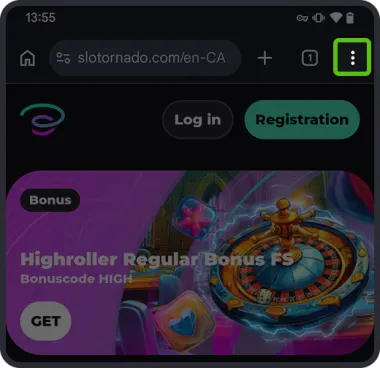 1
1Open the site in Chrome and tap the three-dot menu.
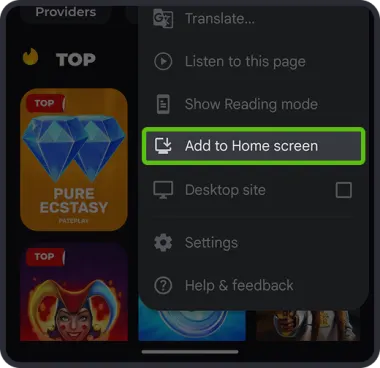 2
2Select “Add to Home screen”.
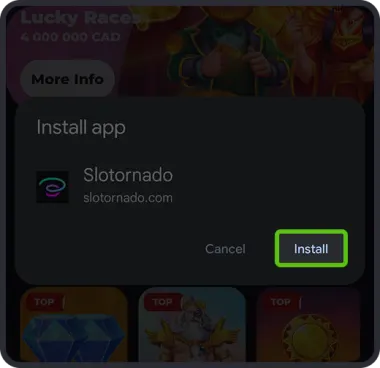 3
3Press “Install” to finish.
iPhone (iOS)
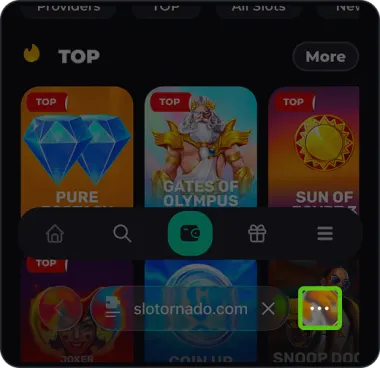 1
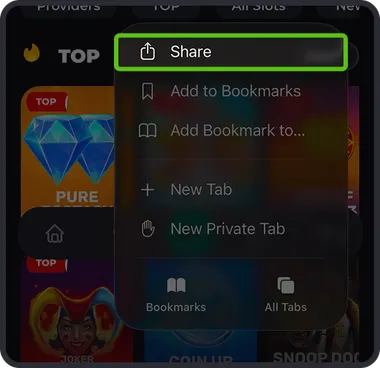
1Open the site in Safari and tap the three dots in the address bar.
 2
2Open the Share sheet.
 3
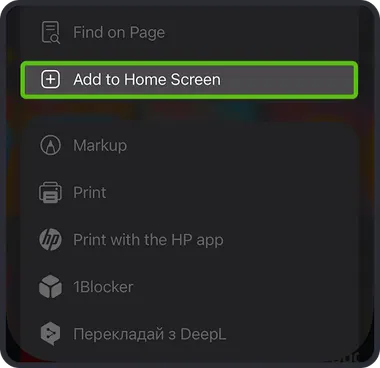
3Scroll until you see “Add to Home Screen”.
 4
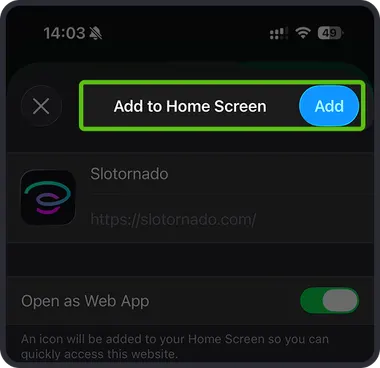
4Press Add (top right).
06Support
Live chat is in the corner of every page. Alternatively, write to support@slotornado.com with your player ID, a short description and, if useful, screenshots.